Roofing CRM automation is the single most overlooked revenue lever in the contracting business. Industry data reveals that 48% of roofing estimates are never followed up on. The salesperson does the inspection, sends the proposal, and then gets pulled to the next lead. Meanwhile, the homeowner who was ready to say yes never hears from you again — and signs with whoever calls them next.
Only 28% of roofing companies currently use a CRM at all. Among those who do, the majority use it as a contact database — not as an automated follow-up machine. That gap represents thousands of dollars in lost jobs every single month for the average roofing operation.
This guide covers exactly how to set up roofing CRM automation — the workflows, the triggers, the sequences, and the tools — so every lead gets followed up consistently without anyone on your team doing it manually.
Why Manual Follow-Up Fails Roofing Companies
Manual follow-up works when lead volume is low and the team is disciplined. However, neither condition holds reliably in a busy roofing operation — especially during storm season.
The Volume Problem
A significant storm event can generate 50 to 100 new leads in 48 hours. No sales team can manually call, text, and track every lead at that volume while simultaneously coordinating inspections, managing materials, and scheduling crews. Leads get missed — not because the team does not care, but because the system cannot handle the load.
The Consistency Problem
Even at normal volume, manual follow-up is inconsistent. Some leads get called three times. Others get called once and forgotten. The homeowner who needed two more touchpoints to feel confident never gets them — and goes with the competitor who happened to follow up one more time.
The Speed Problem
Industry data consistently shows leads contacted within 5 minutes are up to 21 times more likely to convert than leads contacted after 30 minutes. Manual systems cannot guarantee that speed — especially after hours, on weekends, or during storm events when the team is stretched thin.
For a practical look at what that speed gap costs over a full season, read: How to Never Miss a Roofing Lead Again (Even at 2am)
What Roofing CRM Automation Actually Does
Roofing CRM automation replaces every manual follow-up task with a trigger-based workflow that fires automatically based on lead status, time elapsed, or homeowner actions. Understanding the four core automation types is the foundation of building an effective system.
Automation Type 1 — Instant Lead Acknowledgment
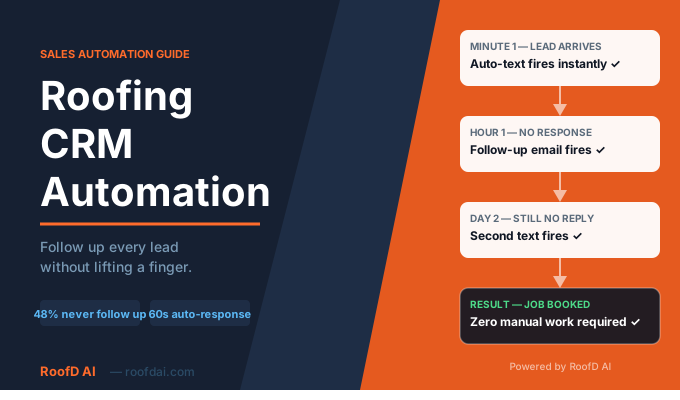
The moment a new lead enters your CRM — whether from a website form, a chatbot conversation, a phone call, or an ad — an automated text fires within 60 seconds. Nobody has to see the lead, decide to respond, or find the homeowner’s number. The system handles it immediately.
This single automation alone recovers a significant percentage of leads that would otherwise go cold. A homeowner who submitted a form at 10pm and receives a professional text within 60 seconds wakes up the next morning already engaged with your company — not your competitor.
Automation Type 2 — Time-Based Follow-Up Sequences
After the initial contact, a sequence of follow-up messages fires based on time elapsed and lead status. If the homeowner has not responded after 24 hours, a follow-up text fires automatically. If they still have not responded after 3 days, another message goes out. Furthermore, if an estimate has gone out but the homeowner has not accepted it after 48 hours, an estimate follow-up fires without anyone checking the pipeline manually.
Automation Type 3 — Stage-Based Pipeline Triggers
Every time a lead moves to a new pipeline stage — from New Lead to Contacted, from Inspection Scheduled to Estimate Sent, from Estimate Sent to Follow-Up Required — a new automation fires. Stage-based triggers ensure the right message goes out at the right moment in the sales process, regardless of which team member manages the lead.
Automation Type 4 — Post-Job Review Requests
After a job closes and moves to the Completed stage in your CRM, a review request fires automatically within 24 hours. That timing is critical — a homeowner who receives a request the day after a great job is dramatically more likely to leave a review than one contacted two weeks later.
For a complete guide to automating your review generation, read: How to Get More 5-Star Google Reviews for Your Roofing Company — Automatically
The Complete Roofing CRM Automation Sequence
Building this sequence inside your CRM is the core deliverable of this guide. Every step below should be configured as a trigger-based automation — not a manual reminder.
Step 1 — New Lead Enters CRM
Trigger: New contact created in any pipeline stage.
An automated text fires within 60 seconds — “Hi [First Name] — [Your Name] from [Company]. Got your message about your roof. What time works best to connect — morning or afternoon?”
Within 5 minutes, an automated email follows — a brief professional introduction with your company overview, recent review highlights, and a booking link.
Simultaneously, a sales rep task gets created — “Call [First Name] within the hour” — with full lead context already populated in the task notes.
Step 2 — No Response After 24 Hours
Trigger: Lead remains in New Lead stage after 24 hours with no activity logged.
A follow-up text fires automatically — “Hi [First Name] — just following up from [Company]. Still happy to come take a look at your roof. Does this week work for a quick inspection?”
For ready-to-use text templates for every stage of this sequence, read: Roofing Follow Up Text Templates That Close More Jobs
Step 3 — Inspection Scheduled
Trigger: Lead moves to Inspection Scheduled stage.
A confirmation text fires immediately — “Hi [First Name] — confirming your roof inspection [Date] at [Time]. See you then!” A reminder fires 24 hours before the inspection. Finally, a day-of text fires 1 hour before arrival — “Hi [First Name] — heading your way for the inspection at [Time]. See you soon.”
Step 4 — Estimate Sent
Trigger: Lead moves to Estimate Sent stage.
After 48 hours with no response, a follow-up text fires — “Hi [First Name] — just checking if you had any questions about the estimate. Happy to walk you through it or adjust anything.”
After 5 days with no response, a financing mention follows — “Hi [First Name] — wanted to mention we offer financing options. Want me to send the details?”
Step 5 — Job Won and Completed
Trigger: Lead moves to Job Completed stage.
Within 1 hour, a thank-you text fires — “Hi [First Name] — great working with you on your new roof. Hope you love it!” Within 24 hours, a review request follows — “If you had a good experience with us, a quick Google review would mean the world. Here is the link: [Review Link]. Thank you!”
Which CRM Platforms Support This Level of Automation
Not every CRM handles automation the same way. Understanding which platforms suit this workflow helps you choose the right tool for your operation.
GoHighLevel — Best for Full Automation Flexibility
GoHighLevel is the most flexible automation platform available for roofing companies. Multi-channel sequences combining text, email, voicemail drops, and task creation all fire from a single lead trigger. Additionally, it integrates directly with RoofD AI via webhook, meaning every lead the chatbot captures arrives in your GoHighLevel pipeline automatically and triggers your full sequence without manual setup.
JobNimbus — Best for Roofing-Specific Workflows
JobNimbus has roofing-specific pipeline stages, webhook integrations, and automation capabilities built around how roofing sales actually work. Its 2025 and 2026 updates added more robust automation features — including automated text triggers and pipeline stage-based workflows. For small to mid-size roofing operations wanting a purpose-built CRM with solid automation, JobNimbus is the strongest option.
AccuLynx — Best for High-Volume Insurance Restoration
AccuLynx automation handles insurance restoration workflows specifically — including adjuster communication, supplement tracking, and production milestone notifications. For contractors doing significant storm restoration volume, AccuLynx automation handles the complexity of insurance workflows better than general-purpose platforms.
For a full side-by-side comparison of JobNimbus and AccuLynx, read: JobNimbus vs AccuLynx — Which CRM Is Right for Your Roofing Company?
How RoofD AI Connects to Your CRM Automation System
Roofing CRM automation is only as powerful as the leads flowing into it. RoofD AI ensures every lead that comes through your website — day or night — enters your CRM automatically with full context, triggering your automation sequence within 60 seconds of arrival.
What Happens When RoofD AI and CRM Automation Work Together
A homeowner visits your website at 11pm after a storm. The RoofD AI chatbot engages them immediately — asking about the damage, collecting their address, pulling a satellite-based estimate range, and capturing their contact details. Within seconds, a fully qualified lead pushes to your CRM via webhook — complete with roof size, damage description, material preference, and estimate range.
The Automation Fires Before Anyone Wakes Up
Your CRM receives the lead and immediately fires the instant acknowledgment text. The homeowner receives a professional response within 60 seconds of finishing their chatbot conversation. By the time your sales rep arrives in the morning, the lead has already received contact, is warm, and has a task waiting with full context. Moreover, if the homeowner responded overnight, the pipeline stage has already updated automatically.
For a broader look at how AI tools work together across the full roofing sales system, read: 5 Ways Roofing Companies Are Using AI to Book More Jobs in 2026
Measuring the ROI of Roofing CRM Automation
The return on investment from CRM automation is unusually clear for roofing companies — because the cost of missed leads is measurable.
The Simple Math
Consider a roofing company spending $150 per lead on Google Ads that loses 30% of leads to slow or missed follow-up. With 60 monthly leads, that represents roughly $2,700 per month in wasted ad spend. CRM automation costing $97 to $297 per month recovers a fraction of those missed leads and pays for itself many times over from a single additional closed job.
What to Track
Track three metrics before and after implementing automation. First, measure average response time to new leads — target under 5 minutes. Second, track lead-to-inspection conversion rate over 60 days. Third, monitor estimate-to-signed contract rate to see whether consistent follow-up improves close rate. Most roofing companies see measurable improvement in all three within the first storm event after implementation.
For a full breakdown of the tools that power this system from lead capture to closed job, read: The Best AI Tools for Roofing Companies in 2026
Frequently Asked Questions About Roofing CRM Automation
Q: How long does it take to set up roofing CRM automation? A basic automation sequence — instant lead acknowledgment text, 24-hour follow-up, inspection confirmation, and review request — takes 2 to 4 hours to configure in most CRM platforms. More complex multi-stage sequences with branching logic take longer. However, the time investment pays back immediately — the sequence runs indefinitely once configured, with zero ongoing manual effort required.
Q: Do I need technical skills to set up CRM automation? No — modern roofing CRM platforms like JobNimbus, GoHighLevel, and AccuLynx have visual workflow builders that require no coding. Drag-and-drop interfaces let you configure trigger conditions, message content, and timing delays without technical knowledge. Furthermore, most platforms have template libraries with pre-built roofing sequences you can activate and customize in minutes.
Q: Can CRM automation work alongside RoofD AI? Yes — and the combination is specifically what makes the system most powerful. RoofD AI captures leads from your website and pushes them to your CRM via webhook automatically. Your CRM automation sequence fires the moment that lead arrives. The homeowner receives an instant response without anyone on your team doing anything manually. See how RoofD AI features connect to your existing CRM.
More Questions About Roofing CRM Automation
Q: What is the most important automation to set up first? The instant lead acknowledgment text — firing within 60 seconds of a new lead entering your CRM — delivers the highest immediate ROI of any automation. It addresses the speed-to-lead gap that costs roofing companies the most jobs. Set this one up before anything else, test it thoroughly, and then build the rest of the sequence around it.
Q: How do I handle storm season lead surges with CRM automation? Automation scales automatically — it handles 5 leads or 500 leads with identical speed and consistency. During storm events, your automation sequence fires for every lead regardless of how many arrive simultaneously. Your team wakes up to an organized, prioritized CRM full of warm leads rather than a chaotic pile of missed calls. For a detailed look at storm season lead capture strategy, read: How Roofing Contractors Can Win More Storm Season Jobs With AI
Q: What happens to leads that go cold despite automation? After a complete follow-up sequence with no response, move the lead to a Long-Term Nurture stage. Configure a monthly check-in text that fires automatically — “Hi [First Name] — just checking in. Whenever you are ready to talk about your roof, we are here.” Additionally, reactivate the full sequence after every storm event in your service area — cold leads often re-engage when urgent weather creates renewed motivation.
Stop Losing Jobs to Missed Follow-Up
Every roofing lead that does not get contacted within 5 minutes is a lead your competitor is winning. Every estimate that sits unfollowed for 48 hours is a job drifting away. Every closed job without a review request is a missed opportunity to strengthen your rankings and reputation.
Roofing CRM automation fixes all three — automatically, consistently, and at scale — without adding a single person to your payroll.
Or start your 7-day free trial — no charge until day 8, cancel any time.